Home › Faces › Mechanical › Redline
Kadran Redline
Animated
Motorsport-inspired mechanical design.
$4.99 one-time · up to 3 watches
Instinct 3 AMOLED · Instinct Crossover AMOLED · fēnix 8/9/E · epix · Forerunner 70/165/170/265/570/965/970 · Venu 2/3/4 · vívoactive 5/6 · MARQ · Approach · Descent · D2
- 5.6% Always-on, Standard level
- 47 watch models
- 5 screen sizes, 360–466 px
- 5.0+ Connect IQ version
Made for
Car and motorsport fans.
Two layouts, one design
Active
The time comes first: heavy Saira Italic on a wide plate, ice-white hours and red minutes, the strongest color on the screen.
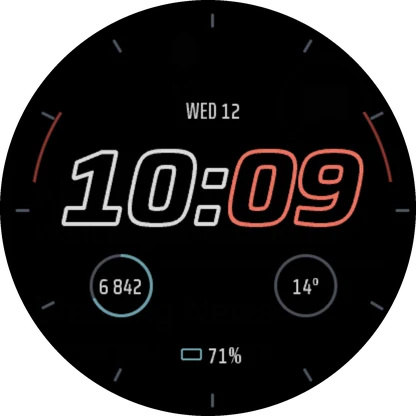
Always-on
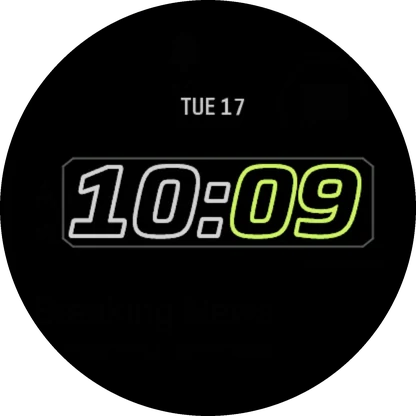
The movement is a photo-like image, so always-on drops it completely: kept lit all day, it would age the screen.
- Pixels lit
- 11.7%
- Shift per minute
- 3 px
Always-on brightness
Four levels in the settings; Standard is the default.
- Brightest9.0%
- Bright7.4%
- Standard (default)5.6%
- Dim2.4%
Three sub-dials
Each sub-dial takes any of 26 data types.
- 1Jewel bearings
- 2Date plate
- 3Ice-white hours
- 4StepsBottom dial: left
- 5Battery plate
- 6Red minutes
- 7Heart rateBottom dial: center
- 8WeatherBottom dial: right
- Bottom dial: left
- Steps · Heart rate · Weather · Battery · Body Battery · +24
- Bottom dial: center
- Steps · Heart rate · Weather · Battery · Body Battery · +24
- Bottom dial: right
- Steps · Heart rate · Weather · Battery · Body Battery · +24
Settings
Change them from the watch menu or the Connect IQ app on your phone.
Appearance
- Show seconds
- On · Off
- Animations
- On · Off
- Thousands separator
- Space · Dot · None
Always-on display
- Always-on color
- Gray · Lume green · Ice blue
- Brightness
- Dim · Standard · Bright · Brightest
Compatibility
Designed at 416 px for Instinct 3 AMOLED and drawn for 360, 390, 454 and 466 px screens.
See it on your watch
Pricing
Install from the Connect IQ Store and use everything free for 7 days. No key, no account.
How it works
Install
Get Kadran Redline from the Garmin Connect IQ Store.
Try for 7 days
Every feature is unlocked.
Buy a key
One-time purchase through Creem.
Paste the key
Garmin Connect app → your watch → Connect IQ → Kadran Redline → Settings → License key.
Payment, VAT and invoice handled by Creem (merchant of record) · 14-day refund window, see refund policy
Lost your key? Sign in to the Creem customer portal with your purchase email, or write to support@slck.cloud.
More from the Mechanical series
Details
See all supported models
| Watch | Screen | Connect IQ | Touch | Notes |
|---|---|---|---|---|
| Instinct 3 AMOLED 50 mm | 416 px | 6.0 | No | Reference device. Settings menu works with buttons. |
| Instinct 3 AMOLED 45 mm | 390 px | 6.0 | No | |
| Instinct Crossover AMOLED | 390 px | 6.0 | No | Physical hands sit above the screen and always show the time; analog faces hide their own hour and minute hands. Not tested on a real watch. |
| fēnix 8 AMOLED 43 mm | 416 px | 6.0 | Yes | AMOLED models only; Solar (MIP) is not supported. |
| fēnix 8 AMOLED 47 / 51 mm | 454 px | 6.0 | Yes | |
| fēnix 8 Pro 47 / 51 mm · quatix 8 Pro | 454 px | 6.0 | Yes | Also the MicroLED edition; always-on behaviour on MicroLED is not confirmed on a real watch. |
| fēnix 9 43 mm | 416 px | 6.0 | Yes | |
| fēnix 9 47 / 51 mm | 454 px | 6.0 | Yes | |
| fēnix 9 Pro 43 mm | 416 px | 6.0 | Yes | |
| fēnix 9 Pro 47 mm | 454 px | 6.0 | Yes | |
| fēnix 9 Pro 51 mm | 466 px | 6.0 | Yes | Largest layout. |
| fēnix E | 416 px | 6.0 | Yes | |
| epix (Gen 2) · quatix 7 Sapphire | 416 px | 5.2 | Yes | |
| epix Pro (Gen 2) 42 mm | 390 px | 5.2 | Yes | |
| epix Pro (Gen 2) 47 mm | 416 px | 5.2 | Yes | |
| epix Pro (Gen 2) 51 mm | 454 px | 5.2 | Yes | |
| Forerunner 70 | 390 px | 6.0 | Yes | |
| Forerunner 165 | 390 px | 5.2 | Yes | |
| Forerunner 165 Music | 390 px | 5.2 | Yes | |
| Forerunner 170 | 390 px | 6.0 | Yes | |
| Forerunner 170 Music | 390 px | 6.0 | Yes | |
| Forerunner 265 | 416 px | 5.2 | Yes | |
| Forerunner 265S | 360 px | 5.2 | Yes | Smallest layout. |
| Forerunner 570 42 mm | 390 px | 6.0 | Yes | |
| Forerunner 570 47 mm | 454 px | 6.0 | Yes | |
| Forerunner 965 | 454 px | 5.2 | Yes | |
| Forerunner 970 | 454 px | 6.0 | Yes | |
| Venu 2 | 416 px | 5.0 | Yes | Oldest supported generation. |
| Venu 2S | 360 px | 5.0 | Yes | |
| Venu 2 Plus | 416 px | 5.0 | Yes | |
| Venu 3 | 454 px | 5.2 | Yes | |
| Venu 3S | 390 px | 5.2 | Yes | |
| Venu 4 41 mm | 390 px | 6.0 | Yes | |
| Venu 4 45 mm · D2 Air X15 | 454 px | 6.0 | Yes | |
| vívoactive 5 | 390 px | 5.2 | Yes | |
| vívoactive 6 | 390 px | 6.0 | Yes | |
| MARQ (Gen 2) | 390 px | 5.2 | Yes | |
| MARQ (Gen 3) | 454 px | 6.0 | Yes | |
| Approach S50 | 390 px | 5.1 | Yes | |
| Approach S70 42 mm | 390 px | 5.1 | Yes | |
| Approach S70 47 mm | 454 px | 5.1 | Yes | |
| Approach S72 43 mm | 416 px | 6.0 | Yes | |
| Approach S72 47 mm | 454 px | 6.0 | Yes | |
| Descent G2 | 390 px | 5.1 | Yes | |
| Descent Mk3 / Mk3i 43 mm | 390 px | 5.1 | Yes | |
| Descent Mk3i 51 mm | 454 px | 5.1 | Yes | |
| D2 Air X10 | 416 px | 5.0 | Yes |
Interaction
- Press and hold a data field to open its Garmin screen, such as heart rate or weather. Works on touchscreen models: every supported model except Instinct 3 AMOLED and Instinct Crossover AMOLED.
- When the trial ends, the face shows a QR code that opens its purchase page. On watches with Connect IQ 6.0; the compatibility table shows each model's version. Other models show the address as text.
- “Animations” under Appearance in the face settings is on by default. Turn it off and the face holds still: no minute or hour transitions and no continuous motion.
Animations
| What moves | Moves on | Stays still on |
|---|---|---|
| Changed digits roll each minute; on the hour the shift lights beside the date plate fire left to right | All 47 supported models in the simulator | None in simulator tests |
| Gear of the upper movement turns | All 47 supported models in our simulator tests | None in simulator tests |
All of this plays only with the wrist raised. Raising your wrist shows the screen ready at once, with no intro animation; in always-on nothing moves. “Animations” in the face settings turns all of it off. The rotating parts were tested in the Connect IQ simulator on all 47 supported models; the compatibility table lists them. They are not yet confirmed on every physical watch; a watch that can't draw rotated images keeps that part still, with no error.
Always-on, measured
Always-on, Standard level
Simulator screen luminance at the default Standard level, measured in the simulator with the widest content (20:08, full fields, long date) on the 416 px build.
Pixels lit
Share of display pixels above 5% brightness.
Shift per minute
The whole always-on layout moves 3 px along an 8-step circle every minute, to vary pixel placement over time.
Always-on brightness
Four levels in the settings; Standard is the default.
| Level | Screen luminance | |
|---|---|---|
| Dim | 2.4 % | |
| Standard (default) | 5.6 % | |
| Bright | 7.4 % | |
| Brightest | 9.0 % | |
10% · CIQ 5+
Simulator measurement with wide content: 20:08, every slot filled and a long date. Results vary with content, level and display size.
Version history
1.1.0 · 18 November 2026
- A key bought for a different face is now named as such on the watch, instead of “key not found”.
- The license message no longer covers the purchase QR code.
1.0.0 · 17 November 2026 · First build. Five screen sizes; photoreal dark steel movement made for each size, shown only with the wrist raised, a small upper gear turning under the bridges; heavy Saira Italic time with ice-white hours and red minutes; three selectable sub-dials with ice-blue tick rings and progress arcs; date plate and battery plate; ice-blue seconds marker on the outer minute track, wrist raised only; always-on with outlined digits and the date; 3 always-on colors, thousands separator, on-watch settings menu, license trial and activation.
- Heart rate and your personal heart-rate zone (Z0–Z5) share one center dial.
- The zone tag appears only with a fresh reading and your own Garmin zones, never guessed.
- Always-on hides an empty dial when its field is off or private.
- The battery dial shows a percent sign, also in always-on.
- Full italic digits: 0, 8 and 9 are no longer clipped at the edges.
Questions
Is the movement animated?
A small gear and the seconds. The gears, bridges and jewels are one still image, made for each screen size. With the wrist raised, a small gear in the upper part of the movement turns on top of it under the fixed bridges, and an ice-blue marker with a short trail sweeps the outer minute track once a minute, like a rev-counter needle. In our simulator tests the gear turns on all 47 supported models; a watch that can't draw rotated images keeps it still, and “Animations” in the settings stops it. The marker is drawn in code, and Show seconds turns it off. In always-on nothing moves.
Why does the movement disappear in always-on?
The detailed movement is designed for the active view. Simulator average luminance is 20.4% with the wrist raised and 5.6% in the outlined always-on view. The movement returns when you raise your wrist. If always-on is disabled in your watch settings, the screen turns off between glances.
What stays on in always-on?
The outlined time, hours in the always-on color you pick (gray, lume green or ice blue) and minutes in a dimmed accent color; the date; and at 15% battery or less a battery warning. The movement image and every data slot go dark. Heart rate, Body Battery, stress and Pulse Ox never show in always-on: the view refreshes once a minute and can be read from across the table. Your data stays on the watch, see the Privacy.
Can I change the colors?
Only in always-on. The high-power colors are part of the movement image, so they stay as designed. Under Always-on color, pick gray, lume green or ice blue for the outlined hours; the minutes keep a dimmed accent color.
How do I change what each slot shows?
On the watch, open the face's settings menu (no phone needed): the three sub-dials, seconds, thousands separator and always-on color. Or in the Garmin Connect app: your watch → Connect IQ → Kadran Redline → Settings, with the same options.