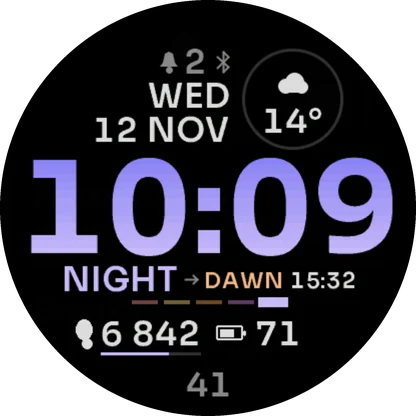
A watch face that changes with the daylight.
$3.49 one-time · up to 3 watches
Instinct 3 AMOLED · Instinct Crossover AMOLED · fēnix 8/9/E · epix · Forerunner 70/165/170/265/570/965/970 · Venu 2/3/4 · vívoactive 5/6 · MARQ · Approach · Descent · D2
- 4.8% Always-on, Standard level
- 47 watch models
- 5 screen sizes, 360–466 px
- 5.0+ Connect IQ version
Made for
Photographers, runners and outdoor lovers who time their day by the light.
Two layouts, one design
Active
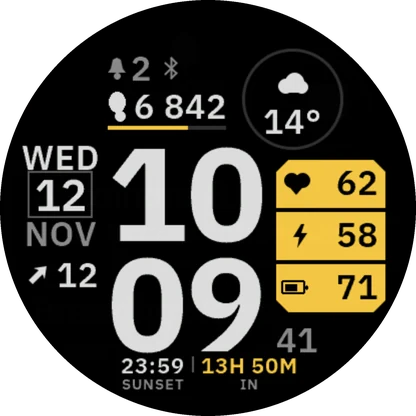
The time is the biggest and brightest thing on the screen, and its color is the second thing you notice.
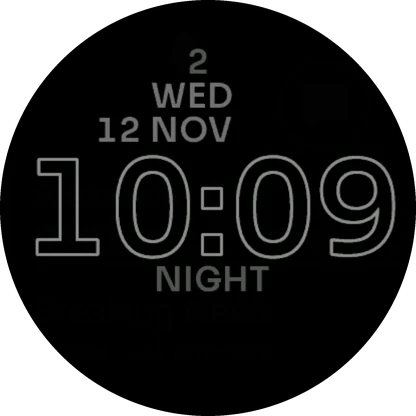
Always-on
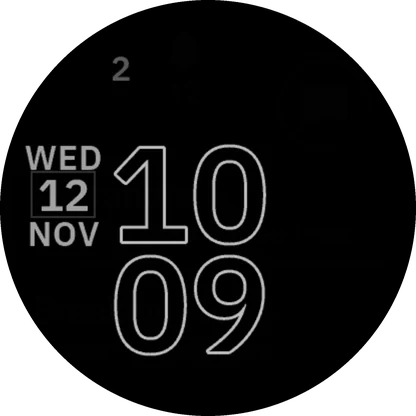
Digits become 2.5 px outlines in a dimmed version of the phase color, gray at night.
- Pixels lit
- 12.0%
- Shift per minute
- 3 px
Always-on brightness
Four levels in the settings; Standard is the default.
- Brightest8.3%
- Bright6.5%
- Standard (default)4.8%
- Dim2.0%
Three slots
Gloam keeps data light.
- 1Date
- 2Sky-gradient time
- 3StepsBottom row: left
- 4Seconds
- 5WeatherWindow ring
- 6Day phase
- 7Five-bar ruler
- 8BatteryBottom row: right
- Window ring
- Heart rate · Weather · Battery · Body Battery · Stress · +13
- Bottom row: left
- Steps · Heart rate · Weather · Battery · Body Battery · +27
- Bottom row: right
- Steps · Heart rate · Weather · Battery · Body Battery · +27
Settings
Change them from the watch menu or the Connect IQ app on your phone.
Appearance
- Clock color
- Follow time of day · Dawn · Day · Golden hour · Dusk · Night
- Clock fill
- Gradient · Solid
- Show seconds
- On · Off
- Animations
- On · Off
- Thousands separator
- Space · Dot · None
Always-on display
- Always-on bottom line
- Time of day · Battery · None
- Always-on clock color
- Time-of-day color · Plain
- Always-on color
- Gray · Lume green · Ice blue
- Brightness
- Dim · Standard · Bright · Brightest
Compatibility
Designed at 416 px for Instinct 3 AMOLED and scaled by ratio to 360, 390, 454 and 466 px screens, with Sora bitmap fonts built for each size.
See it on your watch
Pricing
Install from the Connect IQ Store and use everything free for 7 days. No key, no account.
How it works
Install
Get Kadran Gloam from the Garmin Connect IQ Store.
Try for 7 days
Every feature is unlocked.
Buy a key
One-time purchase through Creem.
Paste the key
Garmin Connect app → your watch → Connect IQ → Kadran Gloam → Settings → License key.
Payment, VAT and invoice handled by Creem (merchant of record) · 14-day refund window, see refund policy
Lost your key? Sign in to the Creem customer portal with your purchase email, or write to support@slck.cloud.
Similar faces
Details
See all supported models
| Watch | Screen | Connect IQ | Touch | Notes |
|---|---|---|---|---|
| Instinct 3 AMOLED 50 mm | 416 px | 6.0 | No | Reference device. Settings menu works with buttons. |
| Instinct 3 AMOLED 45 mm | 390 px | 6.0 | No | |
| Instinct Crossover AMOLED | 390 px | 6.0 | No | Physical hands sit above the screen and always show the time; analog faces hide their own hour and minute hands. Not tested on a real watch. |
| fēnix 8 AMOLED 43 mm | 416 px | 6.0 | Yes | AMOLED models only; Solar (MIP) is not supported. |
| fēnix 8 AMOLED 47 / 51 mm | 454 px | 6.0 | Yes | |
| fēnix 8 Pro 47 / 51 mm · quatix 8 Pro | 454 px | 6.0 | Yes | Also the MicroLED edition; always-on behaviour on MicroLED is not confirmed on a real watch. |
| fēnix 9 43 mm | 416 px | 6.0 | Yes | |
| fēnix 9 47 / 51 mm | 454 px | 6.0 | Yes | |
| fēnix 9 Pro 43 mm | 416 px | 6.0 | Yes | |
| fēnix 9 Pro 47 mm | 454 px | 6.0 | Yes | |
| fēnix 9 Pro 51 mm | 466 px | 6.0 | Yes | Largest layout. |
| fēnix E | 416 px | 6.0 | Yes | |
| epix (Gen 2) · quatix 7 Sapphire | 416 px | 5.2 | Yes | |
| epix Pro (Gen 2) 42 mm | 390 px | 5.2 | Yes | |
| epix Pro (Gen 2) 47 mm | 416 px | 5.2 | Yes | |
| epix Pro (Gen 2) 51 mm | 454 px | 5.2 | Yes | |
| Forerunner 70 | 390 px | 6.0 | Yes | |
| Forerunner 165 | 390 px | 5.2 | Yes | |
| Forerunner 165 Music | 390 px | 5.2 | Yes | |
| Forerunner 170 | 390 px | 6.0 | Yes | |
| Forerunner 170 Music | 390 px | 6.0 | Yes | |
| Forerunner 265 | 416 px | 5.2 | Yes | |
| Forerunner 265S | 360 px | 5.2 | Yes | Smallest layout. |
| Forerunner 570 42 mm | 390 px | 6.0 | Yes | |
| Forerunner 570 47 mm | 454 px | 6.0 | Yes | |
| Forerunner 965 | 454 px | 5.2 | Yes | |
| Forerunner 970 | 454 px | 6.0 | Yes | |
| Venu 2 | 416 px | 5.0 | Yes | Oldest supported generation. |
| Venu 2S | 360 px | 5.0 | Yes | |
| Venu 2 Plus | 416 px | 5.0 | Yes | |
| Venu 3 | 454 px | 5.2 | Yes | |
| Venu 3S | 390 px | 5.2 | Yes | |
| Venu 4 41 mm | 390 px | 6.0 | Yes | |
| Venu 4 45 mm · D2 Air X15 | 454 px | 6.0 | Yes | |
| vívoactive 5 | 390 px | 5.2 | Yes | |
| vívoactive 6 | 390 px | 6.0 | Yes | |
| MARQ (Gen 2) | 390 px | 5.2 | Yes | |
| MARQ (Gen 3) | 454 px | 6.0 | Yes | |
| Approach S50 | 390 px | 5.1 | Yes | |
| Approach S70 42 mm | 390 px | 5.1 | Yes | |
| Approach S70 47 mm | 454 px | 5.1 | Yes | |
| Approach S72 43 mm | 416 px | 6.0 | Yes | |
| Approach S72 47 mm | 454 px | 6.0 | Yes | |
| Descent G2 | 390 px | 5.1 | Yes | |
| Descent Mk3 / Mk3i 43 mm | 390 px | 5.1 | Yes | |
| Descent Mk3i 51 mm | 454 px | 5.1 | Yes | |
| D2 Air X10 | 416 px | 5.0 | Yes |
Interaction
- Press and hold a data field to open its Garmin screen, such as heart rate or weather. Works on touchscreen models: every supported model except Instinct 3 AMOLED and Instinct Crossover AMOLED.
- When the trial ends, the face shows a QR code that opens its purchase page. On watches with Connect IQ 6.0; the compatibility table shows each model's version. Other models show the address as text.
- “Animations” under Appearance in the face settings is on by default. Turn it off and the face holds still: no minute or hour transitions and no continuous motion.
Animations
| What moves | Moves on | Stays still on |
|---|---|---|
| Changed digits rise from the horizon each minute | All 47 supported models in the simulator | None in simulator tests |
| On the hour a light sweeps the phase ruler; when the phase changes, its marker slides to the new one | All 47 supported models in the simulator | None in simulator tests |
All of this plays only with the wrist raised. Raising your wrist shows the screen ready at once, with no intro animation; in always-on nothing moves. “Animations” in the face settings turns all of it off.
Always-on, measured
Always-on, Standard level
Simulator screen luminance at the default Standard level, measured in the simulator with the widest content (20:08, full fields, long date) on the 416 px build.
Pixels lit
Share of display pixels above 5% brightness.
Shift per minute
The whole always-on layout moves 3 px along an 8-step circle every minute, to vary pixel placement over time.
Always-on brightness
Four levels in the settings; Standard is the default.
| Level | Screen luminance | |
|---|---|---|
| Dim | 2.0 % | |
| Standard (default) | 4.8 % | |
| Bright | 6.5 % | |
| Brightest | 8.3 % | |
10% · CIQ 5+
Simulator measurement with wide content: 20:08, every slot filled and a long date. Results vary with content, level and display size.
Version history
1.1.0 · 18 November 2026
- A key bought for a different face is now named as such on the watch, instead of “key not found”.
- The license message no longer covers the purchase QR code.
1.0.0 · 17 November 2026 · First build. Five screen sizes; 127 px Sora time with a 12-band vertical gradient, five day phases from your sunrise and sunset with a 20-minute blend, phase name and five-bar ruler, fixed times until a location is known, color lock and solid fill options, three selectable slots, step goal bar in the phase color, always-on in the phase's dimmed color or a plain color, always-on bottom line setting, 3 always-on colors, on-watch settings menu, license trial and activation.
- The phase line shows what comes next and when it starts, in local time (DAY → GOLDEN 20:46).
- Next-phase times follow your 12/24-hour setting. With no sun data they are hidden, not guessed.
- The active phase bar is longer than the others, so you can spot it by shape as well as by color.
- Always-on: battery shows a % sign, even at 100%.
- An empty window slot disappears completely when set to None.
Questions
How does Gloam know the time of day?
From your sunrise and sunset times, which the watch provides from its own sun data, the weather, or a calculation from the last location it knew. Dawn runs from first light to an hour after sunrise, golden hour is the last hour before sunset, dusk lasts until the sky is dark (the sun 6° below the horizon), and night until the next dawn; the rest is day. Golden hour is an approximation: a fixed hour, not the exact sun angle. In polar night the face stays on night all day, under the midnight sun on day.
What if the watch has never known my location?
Then Gloam uses fixed times: dawn 06:00–08:00, day until 17:00, golden hour until 18:00, dusk until 19:00, night until 06:00. The active bar in the ruler is drawn hollow to show this, with no error message. Once the watch knows a location, from a weather update or a GPS activity, the real times take over for good.
What stays on in always-on?
The outlined time in a dimmed version of the phase color, gray at night; the day and date; and the phase name, which you can swap for battery or nothing in settings. The bell and count show only when there are notifications, the Bluetooth icon only when the phone link drops, and at 15% battery or less a warning takes the phase line. The gradient, ruler, window, fields and seconds go dark. Heart rate, Body Battery, stress and Pulse Ox never show in always-on: the view refreshes once a minute and can be read from across the table. Your data stays on the watch, see the Privacy.
Can I keep one color all day?
Yes. Under Clock color, pick Dawn, Day, Golden hour, Dusk or Night instead of Follow time of day. The phase name and the ruler still show the real phase; only the colors stay put. Under Clock fill you can switch from the gradient to a solid color, and under Always-on clock color pick Plain to use gray, low green or ice blue instead of the phase color.
How do I change what each slot shows?
On the watch, open the face's settings menu (no phone needed): the window, both bottom fields, clock color, clock fill, seconds, thousands separator, the always-on bottom line, always-on clock color and always-on color. Or in the Garmin Connect app: your watch → Connect IQ → Kadran Gloam → Settings, with the same options.